| Review: DV Companion Intelligent Assistant for Final Cut Pro 3 |
 March, 2002
DV
Companion
Intelligent Assistant for Final Cut Pro 3
by Philip Hodgetts
Regular Price: $99.00
Upgrade Price $29.95
Review by Ken
Stone
FCP tutorials come in a number
of different formats. Books, Interactive CD roms, VHS tapes,
on line web sites and in the future DVDs.
DV Companion for FCP 3 comes in
a truly unique format. Installing the Intelligent Assistant from
CD rom loads 270 megs of text pages, images, indices and movies.
This material is stored in the Applications folder on your hard
drive. There are over 600 'How To' pages, 2 hours and 45 minutes
of instructional movies, an index and a search engine that not
only searches the entire Intelligent Assistant by 'Keywords'
but will also search based on questions you type into the search
box.
DV Companion will run in OS X Classic.
To install, boot into OS 9 and run the installer. After the install
is complete, there will be a second application in the Intelligent
Assistant folder (inside Applications OS 9) called "IntelligentAssistantClassic".
This is the version that will run in OS X Classic mode. An OS
X native version is being worked on and will be a free upgrade
when it's ready.
What is unique about this product
is the way it works and the fact that it's always there ready
to be called upon at any time. Other tutorials are formatted
as lessons or exercises as is the case with Books, CDs or VHS
tapes. DV Companion is different. It is very much like having
someone sitting next to you to answer your questions for you.
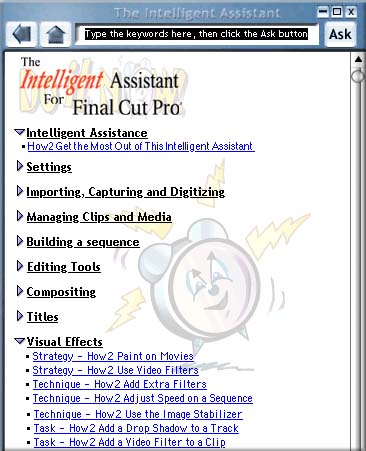 Selecting the
'Intelligent Assistant' from your Apple menu opens the Table
of Contents page, which now, as a new feature, 'floats' on the
screen. This means that you can have Intelligent Assistant open
and in view while you are working in FCP. The interface changes
size according to the function, the interface can also be minimized
taking up less space on your screen.
Selecting the
'Intelligent Assistant' from your Apple menu opens the Table
of Contents page, which now, as a new feature, 'floats' on the
screen. This means that you can have Intelligent Assistant open
and in view while you are working in FCP. The interface changes
size according to the function, the interface can also be minimized
taking up less space on your screen.
The opening page has the search
engine at top center. Just to the right are the buttons that
control the size of the window. To the left are the Return and
Table of Contents page buttons.
The Table of Contents, shown right,
list the main categories. Each category contains three different
approaches to the subject matter.
Strategies
give an overview of the subject matter.
Techniques describes a work flow to produce the desired
outcome.
Tasks provides the actual step by step instructions.
At the bottom of the Table of Contents:
Overcoming common problems, Jargon Buster (a glossary), the Registration
link and an Intelligent Assistant Update link. If your Mac is
on line, clicking on the Update Link will automatically update
your DV Companion with any new material that is currently available.
Shown below is the Techniques page for a 'Picture in Picture'
effect. As the technique is being explained, links to each Task
to be done are provided.

Clicking on the Task link opens the Task
window, shown below. The Task window is smaller and can be viewed
in two ways. As text, with each step written down. Or as a movie
showing you the steps. You can stop the movie and replay any
part you want. The Voice Over explains what you are seeing. Both
the video and audio of these movies is quiet good. That's what's
eating up all that hard drive space. (g)
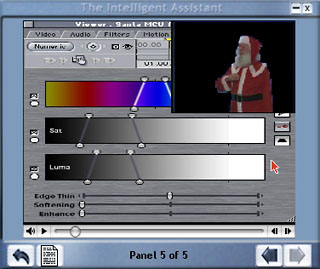
The movie below, is 'Color Keying' and
the inset picture in the upper right shows the effects of moving
the sliders below. At the start of the movie the background color
was blue.
Okay, this is supposed to be a review. I have been running DV
Companion for over a year. This new version sports a completely
new interface and new features. The most important new feature
is the Task window. This is where each process is set out step
by step. Every Task can be viewed as text or a movie and you
can switch back and forth between the two. This is the heart
of Intelligent Assistant. You watch the movie until you have
a sense of it, then switch over to the text window and follow
the step by step instructions as you work in FCP. This is really
an excellent way to learn FCP. Equally important, when you're
stuck with something you can simply ask.
DV Companion sells for $99. A second
component 'Troubleshooting Guide', which is now a separate package,
costs $69.95 and can be purchased separately. The Trouble Shooting
Guide will be shipping soon. The two components will sell together
for a price of $ 149. A new feature of DV Companion for FCP 3
is the 'demonstration mode'. You can obtain the DV Companion
CD from Intelligent
Assistant and demo up to 50 pages of the Companion. If you
like the product you can purchase the unlocking code.
DV Companion is an excellent FCP tutorial.
This new version has been updated with chapters covering all
the new features in FCP 3. The new Task window with it's text
and movie views makes an already excellent tutorial even better.
I highly recommend it.
Enjoy,
--ken
Copyright Ken Stone, 2002.
This article first appeared on www.kenstone.net and is reprinted here
with permission.
All screen captures and
textual references are the property and trademark of their creators/owners/publishers.